Guide
Rivian Gen 1 vs Gen 2: What Actually Changes for Accessories
Rivian split the R1T and R1S into two generations in 2025. Here is which accessories carry over, which are generation-locked, and how to tell before you order.
Rivian documents the R1T and R1S as two distinct generations: Gen 1 vehicles built roughly 2022 through 2024, and Gen 2 vehicles from 2025 onward. From the outside the split is easy to miss — the sheet metal is broadly carried over, and a Gen 2 R1S parked next to a Gen 1 does not read as a redesign. That is exactly why accessory buying goes wrong. Owners see an unchanged silhouette, assume unchanged fitment, and order a part cut for the other generation.
This guide sorts the R1 accessory catalog into three buckets: parts that genuinely carry across both generations, parts that are locked to one, and parts where the listing is silent and you need to verify yourself.
The Three Buckets
| Bucket | What it means | Example |
|---|---|---|
| Carries over | Listing names both generations, or the years span the split | Screen protectors, console tray |
| Generation-locked | Listing names Gen 1 or Gen 2 explicitly and excludes the other | Frunk mat, front license mount |
| Verify yourself | Listing gives years but the geometry is generation-sensitive | Crossbars, running boards |
Why the Front of the Truck Is the Problem Area
The pattern in the catalog is not random. Generation-locked parts cluster at the front of the vehicle, and the two clearest cases are the front trunk and the front fascia.
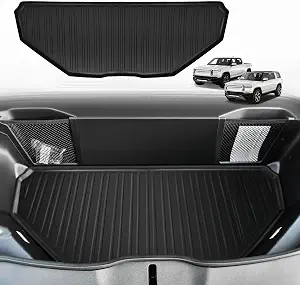
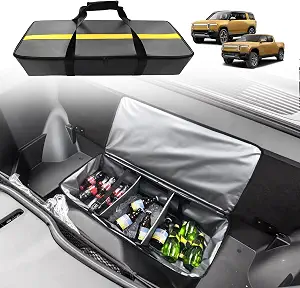
The front trunk changed shape. The Gen 2 frunk mat is listed only for 2025 and 2026 vehicles, and its listing states directly that it is not for a 2022 through 2024 Gen 1 frunk. Running the other direction, the R1 frunk cooler organizer is listed for 2022 through 2024 and makes no claim of Gen 2 fitment. Coverage of the Gen 2 R1 has noted a hood-mounted heat pump that takes up some of the frunk volume Gen 1 left open, which is consistent with two differently shaped compartments needing two differently shaped liners. Either way, the listings agree with each other, and that agreement is the signal worth trusting.
The front fascia changed too. The Gen 2 no-drill license mount fits Gen 2 R1T and R1S only, model years 2025 and 2026. Its listing warns explicitly against assuming Gen 1 grille compatibility. A front plate bracket has to key into specific geometry to be removable and height-adjustable without drilling, so a bracket designed against the Gen 2 front end has nothing to grab on a Gen 1.
If you take one thing from this guide: anything cut to the frunk or mounted to the front fascia is generation-locked until a listing tells you otherwise.
What Genuinely Carries Over
The cabin is far friendlier, because the interior surfaces these products attach to did not move.
- Screens. The R1 three screen protector set is listed for Gen 1 and Gen 2 R1T and R1S, model years 2021 through 2026 — a range that deliberately spans the split. It covers the driver, center, and rear displays in one three-piece matte set.
- The console bin. The Spigen R1 console organizer tray is listed for R1T and R1S 2022 through 2026, so it crosses the generation boundary as well.
- The camp speaker bay. The R1 camp speaker drawer organizer is listed across 2022 through 2026 for both vehicles.
- Charging. The R1 dual wireless phone charger is listed for 2021 through 2026, again spanning both generations. Its real compatibility question is your phone and case, not your truck's build year.
The lesson is that a wide, explicitly stated year range is itself useful evidence. A seller who lists 2021 through 2026 has told you the part is not sensitive to the split. A seller who lists 2025 through 2026 has told you the opposite.
The Verify-Yourself Bucket
Two products sit in between, and they need your attention rather than our assurance.
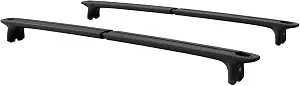
The R1 cargo crossbars are factory cargo hardware, but crossbars serve more than one mounting position on an R1, and the correct position and load limit come from current Rivian documentation for your vehicle. Confirm both before ordering.
The R1 aluminum running boards are listed for R1T and R1S 2022 through 2026, which spans the split, but they mount with vehicle-specific brackets to underbody points. That makes bracket placement, underbody clearance, and included hardware worth confirming against your own truck rather than the year range alone. This is also the one Advanced install in the R1 catalog, and a bracket that almost lines up is a much worse outcome on a side step than on a floor mat.
Where the Generation Split Does Not Apply At All
It is worth separating two different kinds of incompatibility, because owners routinely conflate them and then check the wrong thing.
Generation-locked means the part depends on when your vehicle was built. That is the frunk and the front fascia, as above.
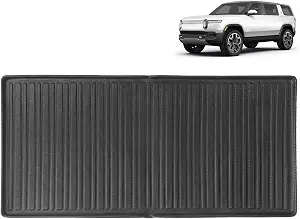
Model-locked means the part depends on which R1 you own, regardless of year. The R1T bed mat is cut for the truck's 4.5 ft bed and has no R1S application at any build year. The R1S all-weather cargo liner is shaped to the SUV's enclosed rear well and its listing says outright that it is not presented for the R1T bed. The R1S no-drill mud flaps are cut to R1S wheel arches, not the truck's.
None of those three care about Gen 1 versus Gen 2. All three cover 2022 through 2026. Checking your build year for a bed mat is wasted effort; checking which vehicle you own is the whole question. Conversely, checking your model for a frunk liner tells you nothing, because both R1s share a frunk within a generation and neither shares one across generations.
So the practical rule has two branches. Is the part cut to the bed, the rear cargo well, or the wheel arches? Check the model. Is it cut to the frunk or mounted to the front fascia? Check the build year. A handful of parts — running boards, crossbars — need both checked plus the hardware confirmed, which is why they sit in the verify-yourself bucket.
How to Identify Your Generation Before You Order
Work from the build, not the badge:
- Check the model year on the door jamb label or your Rivian account, not the year you took delivery. A truck bought in early 2025 can still be a 2024 vehicle.
- Open the hood and look at the frunk. If you are buying anything shaped to that compartment, comparing your own frunk to the listing photos is faster and more reliable than any spec table, including this one.
- Look at the front fascia before ordering a plate bracket, and match it to the product images rather than the model name.
- Read the exclusion, not just the inclusion. The most useful sentence on a Rivian accessory listing is usually the one saying what it does not fit.
When a Listing Is Ambiguous, Treat It as a No
Sellers have a commercial incentive to state the widest range they can defend, so a listing that names a generation is making a real commitment. A listing that names neither, on a part where geometry clearly matters, has not. The catalog here records only what listings actually claim — where a seller declined to claim Gen 2 fitment, we have not claimed it for them, and you should not assume it either. A return shipment on a bed mat is annoying; a running board bracket that does not seat correctly is a safety issue.
Before You Buy
- Confirm your vehicle's model year from the door jamb or your Rivian account before ordering anything frunk- or fascia-shaped.
- Treat frunk liners and front license mounts as generation-locked by default.
- Read wide year ranges as positive evidence of carry-over, and narrow ranges as evidence of a real split.
- For bracket-mounted parts, confirm hardware and clearance against your own vehicle, not the year range.
- Follow current Rivian guidance for cargo, roof loads, recovery points, cameras, sensors, and electrical connections.
- For zone-by-zone product picks, see the R1T bed and cargo guide and the R1S cargo setup guide.
- Per-product fitment notes live on the R1T and R1S accessory hubs.
Last updated: August 2026
EV Drip may earn a commission if you buy through links on this page, at no extra cost to you. Our editorial work is research-based unless a page documents a hands-on test.
Frequently Asked Questions
Do Gen 1 Rivian accessories fit Gen 2 vehicles?
Some do and some do not, and the pattern is predictable. Cabin products — screen protectors, console trays, the camp speaker drawer, the wireless charger — carry ranges that deliberately span both generations. Anything cut to the frunk or mounted to the front fascia is generation-locked until a listing states otherwise.
How do I tell whether my Rivian is Gen 1 or Gen 2?
Work from the model year on the door jamb label or in your Rivian account, not the year you took delivery, since a truck bought in early 2025 can still be a 2024 vehicle. Gen 1 is roughly 2022 through 2024 and Gen 2 is 2025 onward. For frunk-shaped parts, comparing your own frunk to the listing photos is faster and more reliable than any spec table.
What is the difference between model-locked and generation-locked parts?
Bed mats, R1S cargo liners, and R1S mud flaps are model-locked: they depend on which R1 you own and cover 2022 through 2026 regardless of generation. Frunk liners and front license mounts are generation-locked: they depend on build year, and both R1s share a frunk within a generation. Checking the wrong one wastes the check.
What if a listing does not mention the generation at all?
Treat it as a no on any part where geometry clearly matters. Sellers have a commercial incentive to claim the widest range they can defend, so a listing that names a generation is making a real commitment and one that names neither has not. Read the exclusion, not just the inclusion — the most useful sentence is usually what a part does not fit.
Related Products
BestEvMod
Rivian R1S All Weather Cargo Liner
BestEvMod
Rivian R1 Gen 2 Frunk Mat
Rivian
Rivian R1 Cargo Crossbars
BestEvMod
Rivian R1 Frunk Cooler Organizer
EV parts deals & new guides
Optional EV parts deals and buying guides. Unsubscribe anytime.
By subscribing you agree to our Terms and Privacy Policy.