Guide
Rivian R1 Cabin Tech: Screen Protection, Charging, and Console Storage
The R1 cabin is the one area where R1T and R1S accessories genuinely interchange. Screen protectors, magnetic charging, and console organization that fit both.
Almost every hard fitment question on a Rivian lives outside the cabin — the bed, the frunk, the wheel arches, the front fascia. Inside, the picture is much simpler: the displays, the console, and the charging area carried across both the R1T and the R1S and across the Gen 1 to Gen 2 change, and the products cut for them are listed accordingly. If you are new to R1 ownership and want upgrades that cannot go wrong, this is where to start.
That does not mean there are no decisions. Screen protection involves a real finish tradeoff, and magnetic charging depends far more on your phone than on your truck.
The Shared-Cabin Lineup
| Upgrade | What it solves | Install | Fitment risk |
|---|---|---|---|
| Three-screen protector set | Glare and scratches on three displays | Easy | Low — spans both generations |
| Dual magnetic wireless charger | Two phones charging without cables | Easy | Depends on phone and case |
| Console organizer tray | A deep bin that swallows small items | Easy | Low |
| Camp speaker drawer | Unused compartment, no lockable storage | Easy | Low, if the bay is empty |
Three Screens, One Set
The R1 puts glass in three places a passenger touches or squints at: the driver display, the center display, and a rear display. The R1 three screen protector set covers all three in one three-piece kit, listed for Gen 1 and Gen 2 R1T and R1S across model years 2021 through 2026.
Two specifications drive whether you want it. The set is matte anti-glare with a stated 9H hardness rating.
The matte finish is the part to think about, because it is a genuine tradeoff rather than a pure upgrade:
- What you gain: a diffused surface that scatters reflections instead of mirroring them. In a vehicle with a lot of glass and a tall seating position, sun landing on a glossy center display is a daily irritation, and matte film is the direct fix. Matte also hides fingerprints far better, which matters on a screen that is also the primary control surface.
- What you give up: some apparent sharpness and color saturation. Diffusion works by breaking up light, and that applies to the light coming out of the panel as well as the light landing on it. Map detail and photos look very slightly softer.
Owners who park outdoors and drive into low sun generally prefer matte. Owners who want the panel to look exactly as it did from the factory should think twice, because film is easy to install and tedious to live with if you dislike it.
On the hardness rating: 9H describes the film's resistance to scratching from harder objects, which is what protects a touchscreen from rings, zippers, and a child's toy. It is not impact protection, and it is not a claim about the display underneath.
Charging Two Phones Without Cables
The R1 dual wireless phone charger mounts over the R1 center console charging area and takes two phones at once, listed for R1T and R1S from 2021 through 2026. It is a magnetic pad, and that word is doing the important work.
The compatibility question is your phone, not your truck. The listing calls for magnetic wireless charging support, which means the phone or its case has to carry the magnet array — a bare Android handset with no magnetic case will not stick to a magnetic pad, whatever the truck's year. Before ordering, confirm:
- Your phone supports magnetic wireless charging natively, or your case adds it.
- The case is not so thick that it defeats inductive charging through it. Thick armored cases and metal plates are the usual culprits.
- Both phones you intend to charge meet the same requirement, since the whole point of the product is the second position.
Get that right and it removes the single most common cabin annoyance: two people, one cable, and a phone sliding around the console. Get it wrong and you have bought a tray.
The Console: Two Products, Two Different Problems
The R1 console has a deep main bin and a separate camp speaker compartment, and they need different solutions.
The Spigen R1 console organizer tray is a drop-in tray for the main bin, listed for R1T and R1S 2022 through 2026. A deep single void is efficient for volume and terrible for retrieval; anything small sinks to the bottom and you fish for it at a light. The tray divides the top layer into reachable sections while leaving the depth underneath for larger items.
The R1 camp speaker drawer organizer addresses the other compartment, adding a lockable drawer with adjustable dividers, listed across 2022 through 2026 for both vehicles. It is the only lockable cabin storage in this lineup other than the glovebox, which makes it the natural home for a wallet, a passport, or a spare key at a trailhead.
The catch is stated on the listing: it replaces use of that compartment for the Rivian camp speaker. If you carry the speaker, stop here. If the bay has been empty since delivery — which it is for many owners who never added the speaker — this converts dead volume into the most secure space in the cabin.
Installing and Living With Screen Film
Film on a large automotive display is a different job from film on a phone, mostly because the panels are bigger and the cabin is dustier than you think. Three things decide whether the result looks factory or looks like a bubbled afterthought.
Do it cold and clean. Park in shade or a garage, not in sun. A warm panel plus warm film makes the adhesive grabby and unforgiving of repositioning. Wipe with the supplied cleaning materials, then go over the surface again with the dust-lift sticker most kits include — the particle you cannot see is the one that becomes a permanent dimple under a large sheet.
Hinge one edge, then lay it down. On a display this size, dropping the whole sheet at once is how you get a misalignment you cannot fix. Align along one long edge, tack it, and let the rest fall progressively while you push air ahead of the contact line rather than trying to chase bubbles backwards.
Give it a day. Small haze patches and micro-bubbles at the edges of freshly applied film usually resolve on their own as the adhesive wets out over the first day or two. Peeling a sheet back to fix something that would have settled overnight is the most common self-inflicted wound here.
Living with matte film is easy on the cleaning front — it hides fingerprints so well that most owners wipe it less often than the bare panel — but avoid solvent-based glass cleaners, which can haze the anti-glare layer. A dry or barely damp microfibre is all it needs.
Why Everything Here Is Reversible
All four products are Easy installs, and none of them is permanent. Nothing needs adhesive on a painted or trimmed surface, nothing needs a fuse tap, and nothing requires removing trim panels. The screen protectors are film on glass, the charger mounts over an existing charging area, and both console products drop in.
That matters for two reasons beyond convenience. On a leased vehicle, everything comes back out at turn-in. And on a vehicle under warranty, none of these touches wiring, sensors, or structure — the categories where modifications actually create coverage arguments.
The one habit worth keeping: check that nothing you place in the cabin blocks a vent, an airbag deployment path, a camera, or a safety label. A console tray cannot, but a phone mounted in the wrong place can.
Before You Buy
- Decide on matte before ordering screen film; the anti-glare benefit costs a little sharpness and it is not worth reapplying twice.
- Confirm your phone or case supports magnetic wireless charging before buying a magnetic pad, and confirm it for both phones.
- Skip a thick or metal-plated case if you want the pad to charge reliably.
- Choose the camp speaker drawer only if that bay is empty.
- Note that these four products span both generations, so build year is not the risk here — unlike frunk and fascia parts, covered in the Gen 1 vs Gen 2 guide.
- Keep vents, airbag paths, cameras, and safety labels clear of anything you add.
- Per-product fitment notes live on the R1T and R1S accessory hubs.
Last updated: August 2026
EV Drip may earn a commission if you buy through links on this page, at no extra cost to you. Our editorial work is research-based unless a page documents a hands-on test.
Frequently Asked Questions
Do Rivian R1T cabin accessories fit the R1S?
Yes for the products in this guide. The three-screen protector set, dual wireless charger, console organizer tray, and camp speaker drawer are all listed for both vehicles, with ranges spanning Gen 1 and Gen 2. The cabin is the one area of the R1 where accessories genuinely interchange.
Is a matte screen protector worth it in a Rivian?
For most owners, yes, but it is a tradeoff rather than a pure upgrade. Matte film diffuses reflections and hides fingerprints on what is also the primary control surface, which matters in a vehicle with a lot of glass and a tall seating position. You give up a little apparent sharpness and color saturation, because diffusion affects light coming out of the panel too.
Will the R1 dual wireless charger work with my phone?
Only if the phone or its case supports magnetic wireless charging. A bare handset with no magnet array will not hold to a magnetic pad whatever the truck's year. Also avoid thick armored cases and stick-on metal plates, which can defeat inductive charging, and confirm both phones you intend to charge meet the requirement.
Should I use the camp speaker drawer organizer?
Only if that compartment is otherwise empty. The listing states it replaces use of the bay for the Rivian camp speaker. If you carry the speaker it is not your accessory; if the bay has been empty since delivery it converts dead volume into the only lockable cabin storage besides the glovebox.
Related Products
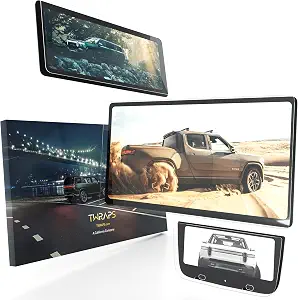
TWRAPS
Rivian R1 Three Screen Protector Set
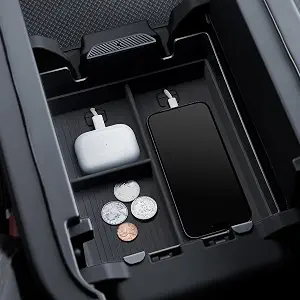
Spigen
Spigen Rivian R1 Console Organizer Tray
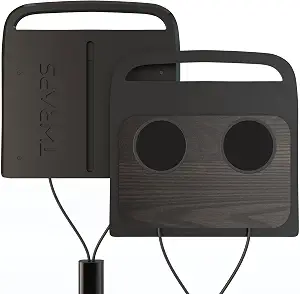
TWRAPS
Rivian R1 Dual Wireless Phone Charger
EV parts deals & new guides
Optional EV parts deals and buying guides. Unsubscribe anytime.
By subscribing you agree to our Terms and Privacy Policy.